

What is the iPhone backup password?
The iPhone backup password protects your iPhone's backups on a computer. It is not your iPhone passcode, not your Apple ID password and not your Mac login. Chatcove needs backup encryption on, because WhatsApp chats are only in encrypted backups.
Everything stays on your Mac. Chatcove keeps the password on this Mac only and never uploads it.
In Chatcove 0.1.8 or later, every card that asks for this password has a What is a backup password? button and a Learn more link that opens this page. The button opens the same explanation inside the app:
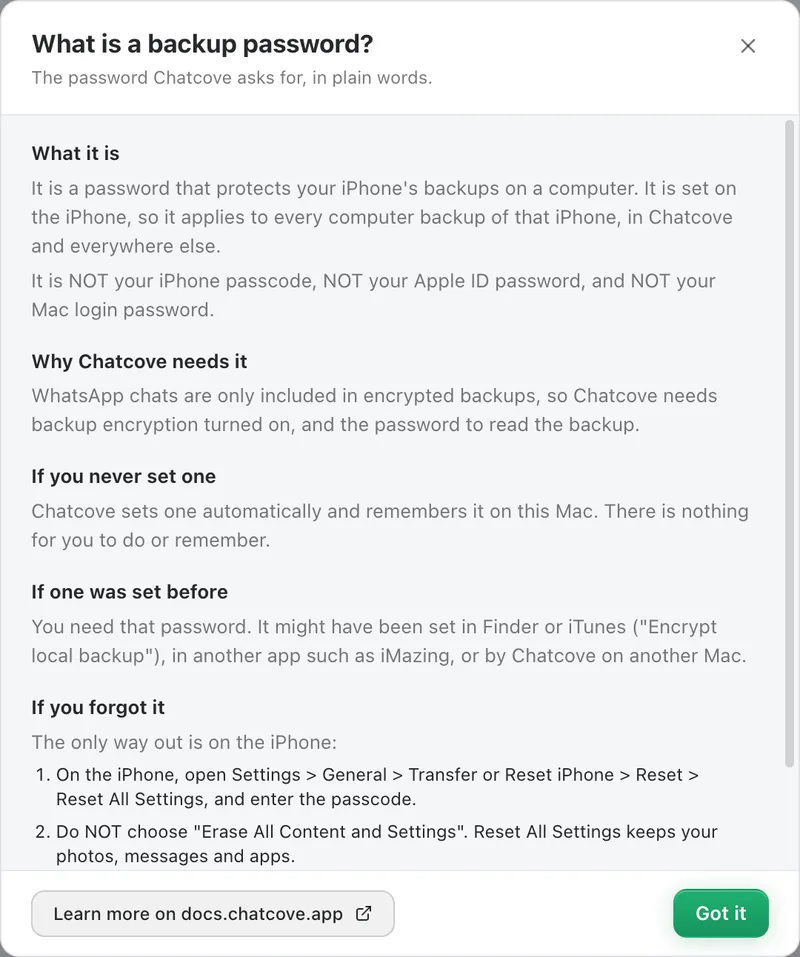
The "What is a backup password?" sheet in Chatcove 0.1.8 or later.
The short version
Section titled "The short version"| Your situation | What to do |
|---|---|
| You never set a backup password | Nothing. Chatcove sets one for you and remembers it on this Mac. |
| You set one before (Finder or iTunes, iMazing or another app, or Chatcove on another Mac) | Enter that password in Chatcove once. See If you already use a backup password. |
| You set one but forgot it | Reset it on the iPhone with Reset All Settings, then back up again. See Forgot your iPhone backup password?. |
| Chatcove says the saved password does not match (Chatcove 0.1.7 or later) | See The saved password does not match. |
Which password is it?
Section titled "Which password is it?"While you export WhatsApp you may meet up to four different passwords. Only one of them is the backup password:
- iPhone passcode: the 4 or 6 digits that unlock the phone. The iPhone asks for it when you tap Trust and when backup encryption is turned on. It is not the backup password.
- Apple ID password: your Apple account and iCloud password. Chatcove never asks for it.
- Mac login password: what you type to unlock your Mac. It is not the backup password either.
- Backup password: a separate password that locks every backup of this iPhone made on a computer. This page is about this one.
The backup password is a setting on the iPhone, not on the computer. While it is on, every computer backup of that iPhone is encrypted with it, whether the backup is made by Finder, iTunes, another app or Chatcove. Apple calls this an encrypted backup. It has nothing to do with iCloud backups.
Why an encrypted backup is required
Section titled "Why an encrypted backup is required"WhatsApp stores its message database in an encrypted backup only, never in an unencrypted one. So Chatcove cannot read your history without encryption on, and it needs the password to open the backup on your Mac. Every tool that exports WhatsApp from an iPhone backup works this way.
Never set one? Chatcove sets it for you
Section titled "Never set one? Chatcove sets it for you"If backup encryption is off, Chatcove turns it on before the first backup. In one-click export this happens on its own; in step-by-step mode you click Turn on encryption on the Backup encryption card. The iPhone asks for its passcode once to confirm.
Chatcove generates a long random password: 25 letters and digits in five groups of five joined by hyphens, with look-alike characters (0, O, 1, l, I) left out. You are not asked to choose, type or remember it.
The setting belongs to the iPhone, so from then on Finder backups of this iPhone are encrypted with the same password. To turn encryption off later in Finder you need that password, or the reset in Forgot your iPhone backup password?.
Set one before? Chatcove needs that password
Section titled "Set one before? Chatcove needs that password"If backup encryption was already on, Chatcove cannot choose a new password. It asks you once for the existing one. It might have been set:
- in Finder or iTunes, with Encrypt local backup, sometimes years ago (encrypted backups also keep Health data, saved passwords and Wi-Fi settings, which is why many people turn it on);
- in another app, such as iMazing, which also needs an encrypted backup to export WhatsApp;
- by Chatcove on another Mac. Each Mac keeps its own copy, so the second Mac asks for it. See Using Chatcove on two Macs.
The steps are on If you already use a backup password.
How to check in Finder whether encryption is on
Section titled "How to check in Finder whether encryption is on"- Connect the iPhone to your Mac with a cable and unlock it.
- Open a Finder window and click your iPhone in the sidebar, under Locations. If the iPhone asks whether to trust this computer, tap Trust and enter the passcode.
- On the General tab, look at the Backups section.
- If Encrypt local backup is ticked, this iPhone has a backup password. If it is not ticked, it has none, and Chatcove sets one.
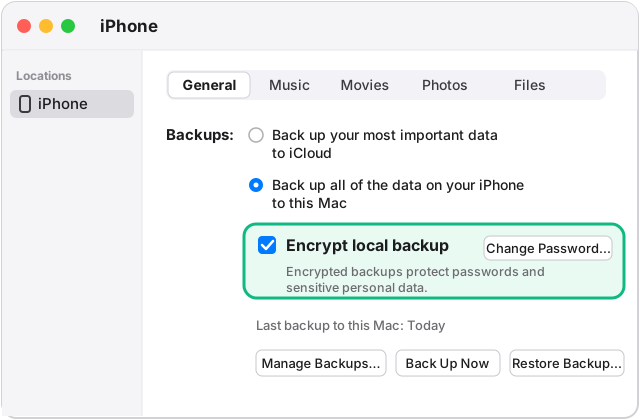
Illustration of the Finder window, General tab. Exact wording can differ between macOS versions.
Only look, do not untick the box. Unticking it asks for the backup password and turns encryption off, and Chatcove needs it on. The box shows the iPhone's own setting, so it looks the same on every Mac.
Forgot it? Reset it on the iPhone
Section titled "Forgot it? Reset it on the iPhone"Apple has no way to recover a forgotten backup password, but you can remove it from the iPhone without erasing your data: Settings > General > Transfer or Reset iPhone > Reset > Reset All Settings. Not Erase All Content and Settings, which erases the iPhone. Reset All Settings keeps your photos, messages and apps, removes the backup password and resets some settings. Then back up again in Chatcove, which sets a new password.
The full steps, what the reset changes, and the Stolen Device Protection delay are on Forgot your iPhone backup password?.
What the Backup encryption card shows
Section titled "What the Backup encryption card shows"On the Backup encryption card (step-by-step mode), Chatcove shows one of these states:
| Pill on the card | What it means |
|---|---|
| Off | Encryption is off on the iPhone. Click Turn on encryption. Chatcove sets a strong password, and the iPhone asks for its passcode once to confirm. |
| On and verified | Encryption is on and Chatcove has a password that is proven to open the backup. You are ready to back up. |
| On, not verified | Chatcove has a saved password, but no backup has confirmed it yet. Your first backup confirms it automatically. |
| Password needed | Encryption is on and Chatcove does not have the password on this Mac. It was set earlier in Finder or iTunes, in another app, or by Chatcove on another Mac. You enter it. |
| Password mismatch | Chatcove 0.1.7 or later. The saved password no longer matches the iPhone's backups, or a password you typed was wrong. See The saved password does not match. |
| Backup too old | Chatcove 0.1.8 or later. The backup on this Mac was made before Chatcove saved the current password. Nothing is wrong with the password: click Back up again. See Wrong password errors. |
What the card looks like when the password is needed
Section titled "What the card looks like when the password is needed"When Chatcove needs a password it does not have, the card says so and shows the field. Chatcove 0.1.8 or later puts "This is not your iPhone passcode, your Apple ID password, or your Mac login password." right under the field.
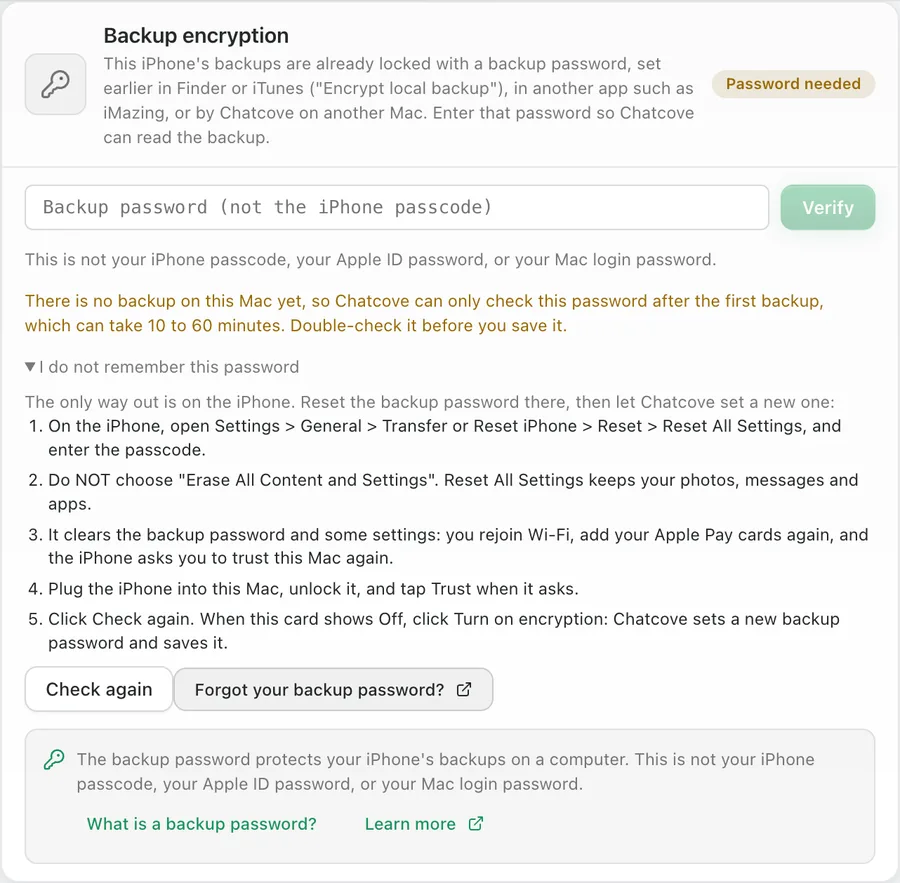
The Password needed card in Chatcove 0.1.8 or later. The screenshot is in English.
If the backup on this Mac cannot check the password yet, the card warns you: Chatcove can only check a typed password after the backup, which can take 10 to 60 minutes, so double-check it before you save it.
Delete Everything and your backup password
Section titled "Delete Everything and your backup password"Settings, Storage has a Delete everything for this iPhone button. It removes the backup, the decrypted history, the search index and the media cache. In Chatcove 0.1.8 or later it also looks at the saved backup password for that iPhone:
- A password that was rejected, or that was never confirmed by a backup, is forgotten. It was not proven to work, so it is more likely to be in your way than to help.
- A password that is confirmed is kept. It is the password the iPhone still uses for every new backup, and if Chatcove set it you never saw it, so forgetting it would leave you needing Reset All Settings on the iPhone just because you freed some disk space.
The iPhone's backup password itself never changes when you delete data in Chatcove, because it is a setting on the iPhone. On 0.1.7 or earlier, Delete everything keeps the saved password whatever its state.
Where the password is saved
Section titled "Where the password is saved"The password is saved on this Mac only, one entry per iPhone. It is encrypted with macOS (the Keychain-backed secure store that Electron's safeStorage uses) and written to a small file called backup-passwords.json in Chatcove's data folder:
~/Library/Application Support/Chatcove/backup-passwords.jsonThat file holds only the encrypted password plus a few labels (who set it, whether it is verified, and when it was saved). The plain password is never written to disk and never appears in logs or problem reports.
Your iPhone backups live in a backups folder next to it by default:
~/Library/Application Support/Chatcove/backups/You can move the backup location to another drive in Settings, Storage.
Questions
Section titled "Questions"Why does Chatcove need this?
Section titled "Why does Chatcove need this?"WhatsApp only includes your chat history in encrypted iPhone backups, and an encrypted backup can only be opened with its password.
Does Chatcove send my password anywhere?
Section titled "Does Chatcove send my password anywhere?"No. It stays on this Mac, encrypted with macOS. It is never uploaded and never included in logs or problem reports.
I use two Macs
Section titled "I use two Macs"Each Mac keeps its own copy of the password. On the second Mac, type the password if you know it. If Chatcove created it on the other Mac and you do not know it, reset it on the iPhone and let the second Mac set a new one; the first Mac then asks again. The simplest setup is to make your backups on one Mac. Details: Using Chatcove on two Macs.
What if I change it later?
Section titled "What if I change it later?"If you change the backup password in Finder, or reset it on the iPhone, Chatcove's saved copy stops matching. Chatcove 0.1.7 or later tells you the saved password does not match and lets you enter the new one or reset it. Backups made with the old password can only be opened with the old password. See The saved password does not match.
In other languages
Section titled "In other languages"The same explanation, translated, is on the Chatcove site: English, Español, Português, Italiano, Deutsch, Nederlands, עברית, العربية, Русский, 中文, 日本語.